Introduction: A Security Alert That Tells a Bigger Story
Recently, we received a security alert from UpCloud Security Operations regarding a spam complaint originating from one of our mail servers. At first glance, it looked concerning—Microsoft had flagged a message from our infrastructure as spam. But as we dove into the email headers and traced the message path, what emerged was a perfect case study demonstrating why email hosting remains one of the most complex challenges in web infrastructure.
The UpCloud security team's response after our investigation said it all: "Yeah now looking at the header, it's a mess."
This incident touches on nearly every critical aspect of modern email management: spam filtering, sender reputation, forwarding configurations, feedback loops, and the cascading effects that a single misconfigured email can have across multiple parties. After nearly 20 years managing hundreds of email mailboxes, we've learned that email security isn't just about blocking spam—it's about understanding the entire ecosystem.
Let's break down what happened and explore the lessons learned.
The Incident: Decoding the Email Chain
The complaint centered on what appeared to be spam originating from our server. However, detailed analysis of the email headers revealed a different story:
What Actually Happened:
-
Spam was sent TO our client's address (info@[CLIENT-DOMAIN].com), not from it
-
Our spam filter correctly identified and rejected the malicious message
-
The rejection triggered a bounce notification back to the original spam sender ([SENDER]@[SENDER-DOMAIN].com)
-
Microsoft's systems flagged this bounce message as spam
-
This triggered an automated feedback loop to UpCloud
The Real Issue: Server-side email forwarding. The info@ address automatically forwarded to the client's main mailbox ([CLIENT-EMAIL]@[CLIENT-DOMAIN].com), creating additional processing that complicated the message flow.
This incident perfectly illustrates why email troubleshooting requires forensic-level analysis of message headers, SMTP transactions, and delivery chains.
Why This Matters: The Ripple Effect of Email Reputation
Email reputation issues don't exist in isolation. When spam complaints emerge from a mail server—even false positives like this one—the consequences ripple outward:
Impact on Your Client:
-
Damaged sender reputation means legitimate emails get blocked
-
Potential IP blacklisting that affects all outgoing mail
-
Deliverability problems that can cripple business communications
Impact on the Hosting Provider (Us):
-
One compromised account affects everyone on the shared IP
-
Server-wide reputation damage impacts all clients
-
Increased administrative burden investigating complaints
Impact on the Upstream Provider (UpCloud):
-
They must maintain good relationships with major email providers
-
Abuse complaints can affect their entire network
-
They're ultimately responsible to companies like Microsoft and Google
This is why email security is serious business. A single misconfiguration or compromised account can cascade into infrastructure-wide problems.
Understanding Feedback Loops: When Email Providers Fight Back
This incident introduced an important concept: automated feedback loops. When major email service providers like Google, Microsoft, Yahoo, and others identify spam, they don't just block it—they report it back to the source.
We subscribe to feedback loops from multiple major providers, receiving real-time notifications when our infrastructure appears in spam complaints. This allows us to:
-
Quickly identify compromised accounts
-
Spot configuration issues before they escalate
-
Maintain proactive monitoring of our sender reputation
-
Address problems before IP blacklisting occurs
According to 2025 email security research, feedback loops have become increasingly sophisticated, with providers now sharing threat intelligence and coordinating responses to large-scale spam campaigns.
Sender Reputation: Your Most Valuable Email Asset
In 2025, sender reputation determines whether your emails reach the inbox or get filtered into spam. Recent data shows that 94% of all malware is delivered via email, making providers increasingly aggressive with filtering.
Key factors affecting reputation:
-
IP Address History: Clean IPs are worth their weight in gold
-
Authentication Records: Proper SPF, DKIM, and DMARC configuration
-
Bounce Rates: High bounce rates signal poor list hygiene
-
Spam Complaints: Even a small percentage can damage reputation
-
Send Volume Patterns: Sudden spikes trigger suspicion
Recent breach data reveals that 79% of breached domains had ineffective DMARC protection—a massive jump from 65% in 2024. This configuration failure represents one of the most common vulnerabilities we see.
Our Approach to Protecting Reputation:
We maintain dedicated clean IP addresses for corporate email and implement strict authentication protocols. For clients requiring high deliverability, we recommend (and can configure) dedicated IP addresses to isolate their reputation from shared hosting environments.
Offloading Website Email: A Critical Best Practice
One reason we knew this spam didn't originate from the client's websites: we'd already configured both sites to route all form notifications and email delivery through Amazon SES (Simple Email Service).
Why This Matters:
Compromised WordPress sites are frequently used to blast spam via PHP's mail() function or Sendmail. When hackers gain access to a website, they inherit the server's ability to send email—and they abuse it mercilessly.
By offloading website email delivery to a dedicated email service provider, we:
-
Completely eliminate the website-to-spam attack vector
-
Maintain separate reputation systems for website vs. mailbox email
-
Gain detailed delivery analytics and bounce handling
-
Ensure critical transactional emails (password resets, order confirmations) get delivered
Read more about our Website Email Delivery service
This architectural decision meant we could immediately rule out website compromise as the source of the complaint, narrowing our investigation significantly.
The Website Hacking Threat: Proactive Defense
Website compromise remains a major vector for email spam abuse. Recent data shows that attackers are increasingly sophisticated, with AI-powered attacks growing 87% in the last year.
Our Multi-Layer Defense:
1. Immunify360: Our primary weapon against malware
-
Weekly automated website scanning
-
Proactive defense that identifies malware based on behavior, not signatures
-
Can detect zero-day threats that traditional signature-based systems miss
-
Real-time blocking of malicious file execution
2. Regular Updates: We maintain WordPress core, themes, and plugins
-
Automated security patches
-
Vulnerability monitoring
-
Proactive notifications about known exploits
3. File Integrity Monitoring: Alerts when unexpected changes occur
-
Detects unauthorized file modifications
-
Identifies backdoors and web shells
-
Provides forensic data for incident response
According to 2025 threat reports, supply chain attacks through vendor impersonation have increased, with 16% of email-related breaches involving business associates. This makes comprehensive website security more critical than ever.
Email Account Compromise: The Other Attack Vector
Websites aren't the only target—email accounts themselves can be compromised through phishing, credential stuffing, or brute force attacks.
Plesk Outgoing Mail Limits:
We leverage Plesk's built-in protection to set reasonable sending limits on all email accounts. Benefits include:
-
Automatic alerts when accounts exceed normal sending patterns
-
Immediate investigation of suspicious activity
-
Prevention of large-scale spam blasts from compromised accounts
-
Per-account customization based on legitimate sending needs
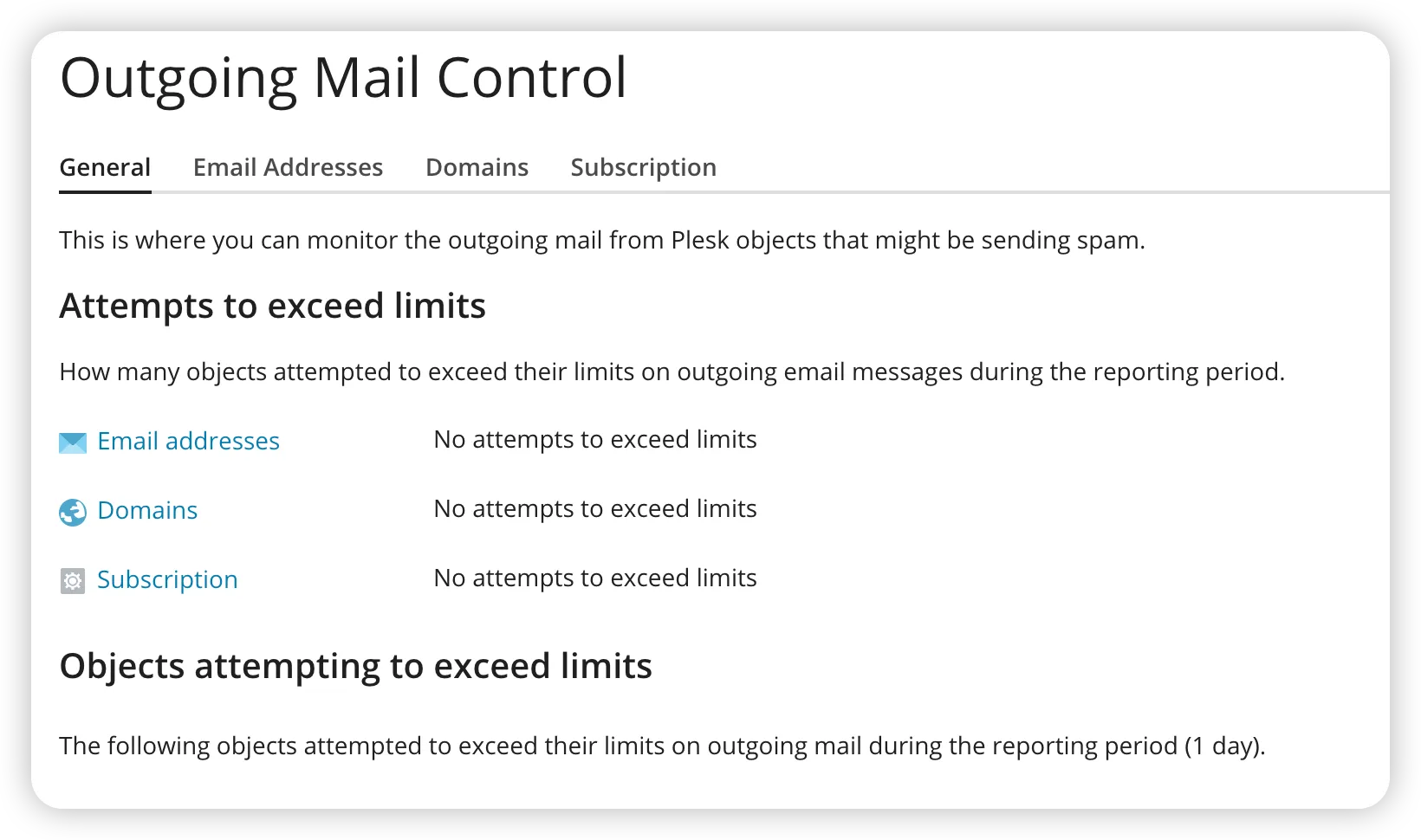
Real-World Example: Recently, a client's email password was compromised through a phishing attack. Within minutes of the attacker attempting to send bulk email, our monitoring systems triggered alerts. We locked the account, reset credentials, and blocked the suspicious traffic before more than a handful of messages were sent. Total damage: minimal. Without these limits? The account could have blasted thousands of spam messages, destroying our IP reputation.
Our Spam Filtering Arsenal: Keeping Mailboxes Clean
When spam does target our clients (as in this incident), our multi-layer filtering system provides robust protection:
Warden Anti-Spam and Security (Plesk Extension):
-
Advanced heuristic analysis
-
Real-time threat detection
-
Customizable filtering rules per domain
SpamHaus Subscription:
-
Access to industry-leading spam IP databases
-
Real-time blacklist checking
-
Protection against known spam sources
-
Updated continuously as new threats emerge
Malware Signature Feed:
-
Subscription service providing real-time malware signatures
-
Protection against email-borne malware and ransomware
-
Blocks weaponized attachments and malicious URLs
How They Work Together:
These systems operate in layers, with each message passing through multiple checks before reaching the inbox. The result: comprehensive spam protection that works naturally and unobtrusively.
Read more about WebOps Hosting Email Hosting
In this specific incident, our spam filter correctly identified and blocked the inbound spam, exactly as designed. The only complication was the forwarding configuration triggering the feedback loop.
The Info@ Problem: Why Generic Addresses Are Spam Magnets
This incident highlighted an issue we've been warning clients about for years: generic email addresses like info@, contact@, hello@, and office@ are spam magnets.
Why They Attract Spam:
-
Spammers don't need to discover them—they simply assume they exist
-
Automated spam bots blast these addresses on every domain
-
No verification needed; it's a free-for-all
-
Your address doesn't need to be published anywhere to become a target
The Numbers:
Generic addresses typically receive 10-50x more spam than personalized addresses. Even with excellent filtering, the sheer volume creates problems:
-
Increased server load processing spam
-
Higher risk of false positives blocking legitimate mail
-
Forwarding amplifies the problem when one generic address routes to multiple recipients
Our Recommendation:
Simply don't create these addresses. Use personalized email addresses (firstname@, firstname.lastname@) combined with contact forms for website inquiries. The reduction in spam is dramatic and immediate.
Contact Forms vs. Published Email Addresses
For years, we've recommended a simple principle: Don't publish email addresses on your website if you can possibly avoid it.
Why Publishing Emails Is Dangerous:
-
Web crawlers constantly scrape websites for email addresses
-
Harvested addresses are sold on spam lists
-
Once published, the address is permanently compromised
-
No way to "unpublish" once crawlers have captured it
The Alternative: Contact Forms
Modern contact forms (like Gravity Forms, which we deploy with our agency license) provide better functionality:
-
Built-in spam protection (reCAPTCHA, honeypots, hCaptcha)
-
Validation of required fields
-
No exposed email addresses for bots to harvest
-
Better user experience with structured data collection
-
Integration with CRM and marketing automation tools
When You MUST Publish an Email:
Sometimes you have no choice—association directories, industry listings, or regulatory requirements may demand published contact information.
Our Solution: Email Address Encoder Premium
We maintain an agency license for the premium version of Email Address Encoder, premium WordPress software that displays emails normally to humans but presents garbage to automated crawlers.
The plugin encrypts email addresses in the HTML source code, making them unreadable to bots while maintaining perfect functionality for legitimate visitors. It's an elegant solution when publishing addresses is unavoidable.
Monitoring and Diagnostics: Quick Response to Issues
When UpCloud's security team alerted us to the complaint, we didn't need hours or days to investigate. Within minutes, we'd:
-
Pulled the complete email headers from our logging system
-
Traced the message path through our infrastructure
-
Identified the original sender (the spam source)
-
Analyzed the spam filter response (correctly blocked)
-
Determined the forwarding configuration as the complication
-
Provided a detailed explanation to UpCloud
Our Email Monitoring Software:
We run specialized software that continuously monitors email delivery and maintains searchable logs of all mail transactions. This provides:
-
Delivery Rate Analytics: Pie charts showing successful deliveries vs. bounces vs. deferred messages
-
Quick Log Searches: Instant lookup by sender, recipient, subject, or timestamp
-
Real-Time Alerting: Notifications when delivery rates drop or bounce rates spike
-
Historical Trending: Long-term visibility into email patterns and issues
-
Forensic Capabilities: Complete message traces for troubleshooting
[Insert sample delivery report pie charts showing successful delivery, bounces, deferrals]
This level of visibility is essential for professional email hosting. When issues arise—and they will—rapid diagnosis means minimal disruption to client operations.
Conclusion: Email Expertise Matters
As UpCloud's security team noted, email headers can be "a mess." But that mess tells a story—one that requires experience and expertise to decode properly.
This single incident touched on:
-
Email authentication and reputation management
-
Spam filtering and feedback loops
-
Website security and malware prevention
-
Email account compromise protection
-
Configuration best practices for forwarding
-
The importance of not publishing email addresses
-
Real-time monitoring and rapid response
After nearly two decades managing email infrastructure at scale, we've encountered virtually every email-related issue imaginable: delivery problems, blacklist removals, spam floods, compromised accounts, configuration nightmares, and authentication failures.
This experience means that when problems arise—whether legitimate issues or false positives like this incident—we can quickly diagnose the root cause, explain it clearly, and implement effective solutions.
The Bottom Line:
Email hosting isn't just about providing mailboxes. It's about understanding the entire ecosystem, maintaining reputation, preventing abuse, protecting against threats, and responding rapidly when issues emerge.
Your email infrastructure is too critical to leave to chance. It requires experienced professionals who understand the complexity and can navigate the challenges.
Want to ensure your email infrastructure is secure, reliable, and properly configured? [Contact us] to discuss how our email hosting solutions can protect your business communications while maintaining excellent deliverability.
Already experiencing email issues? Our team can perform a comprehensive email infrastructure audit to identify vulnerabilities, configuration problems, and reputation risks before they become serious problems.
This blog post is based on a real incident from October 2025. Names and identifying details have been redacted to protect privacy while demonstrating authentic troubleshooting and resolution processes.

No comments yet. Be the first to comment!
Leave a Comment